Why Use Server Components?
React Server Components are one of the biggest architectural improvements introduced in modern React and Next.js. They help reduce JavaScript bundle size, improve performance, enable direct server-side data access, and solve several scalability issues present in traditional client-heavy React applications.
What Are Server Components?
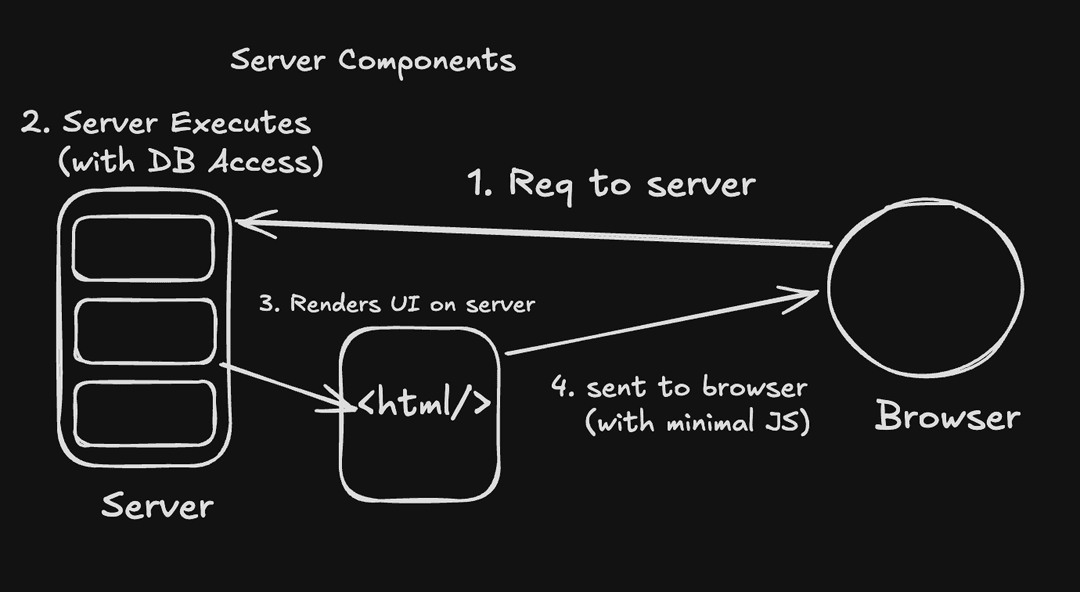
Server Components are React components that execute entirely on the server instead of the browser. Unlike traditional React components, their JavaScript is never shipped to the client. The server renders the component output and sends only the required UI to the browser.
How It Works
- User requests a page
- Server executes Server Components
- Server fetches data directly
- Rendered UI is streamed to browser
- Browser receives minimal JavaScript
Real World Usage
Server Components are commonly used for layouts, dashboards, product pages, blogs, ecommerce pages, and database-driven UI where heavy client-side interactivity is not required.
Pros
- Smaller JavaScript bundles
- Better performance
- Direct backend/database access
- Improved SEO
- Reduced hydration cost
Cons
- Cannot use useState or useEffect
- No browser APIs
- No event handlers
Example
export default async function ProductsPage() {
  const products = await getProducts();

  return (
    <div>
      {products.map((product) => (
        <p key={product.id}>
          {product.name}
        </p>
      ))}
    </div>
  );
}
Interview Tips
- Mention bundle size reduction.
- Explain that JS is not sent to browser.
- Discuss server-side execution.
Why React Introduced Server Components
Traditional React applications often send large JavaScript bundles to the browser. As applications grow, hydration becomes slower and performance degrades. React introduced Server Components to reduce unnecessary client-side JavaScript and move more work to the server.
How It Works
- Server handles rendering work
- Browser receives less JS
- Hydration cost decreases
- Page becomes interactive faster
Real World Usage
Large applications like ecommerce platforms, SaaS dashboards, and content-heavy websites benefit heavily from reduced bundle sizes and server-side execution.
Pros
- Improves scalability
- Reduces browser workload
- Optimizes rendering pipeline
Cons
- Requires understanding client/server boundaries
Interview Tips
- Talk about hydration cost.
- Explain bundle size problems.
- Mention scalability concerns.
Server Components vs Client Components
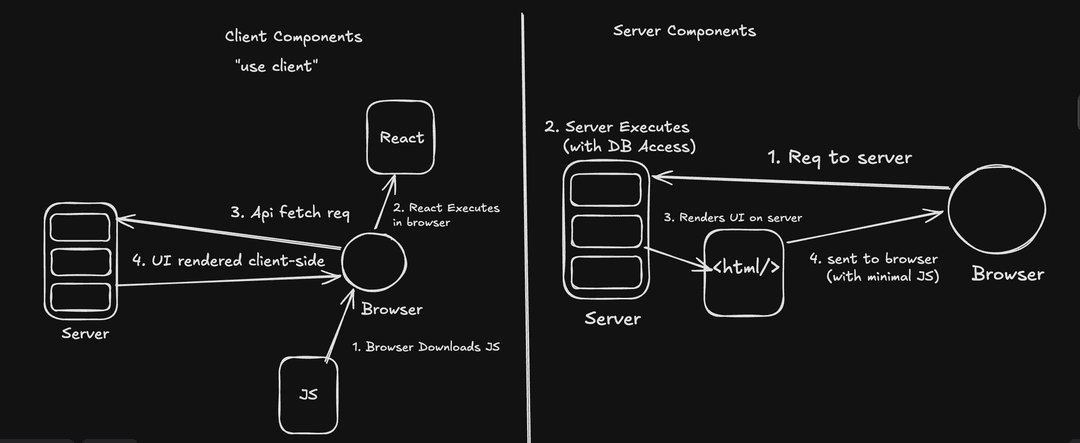
Server Components and Client Components solve different problems. Server Components focus on performance and server-side rendering, while Client Components focus on interactivity and browser-side state management.
Pros
- Clear separation of responsibilities
- Better architecture
Cons
- Overusing Client Components increases bundle size
Example
"use client";

import { useState } from "react";

export default function Counter() {
  const [count, setCount] = useState(0);

  return (
    <button onClick={() => setCount(count + 1)}>
      {count}
    </button>
  );
}
Interview Tips
- Server Components for data fetching.
- Client Components for interactivity.
Streaming Benefits
Server Components support streaming UI from the server. Instead of waiting for the full page to render, the server can progressively stream completed parts of the UI to the browser. This improves perceived performance significantly.
How It Works
- Server starts rendering
- Completed chunks stream immediately
- Browser progressively displays UI
Real World Usage
Streaming is useful for dashboards, ecommerce pages, AI applications, and large content pages where some sections load slower than others.
Pros
- Better perceived performance
- Faster content visibility
Cons
- More architectural complexity
Interview Tips
- Mention Suspense with streaming.
- Talk about progressive rendering.
When To Use Client Components
Client Components should be used only when browser interactivity is required. Features like state management, event handlers, animations, forms, and browser APIs require Client Components.
Pros
- Supports interactivity
- Supports browser APIs
Cons
- Increases bundle size
- More hydration cost
Example
"use client";

import { useState } from "react";

export default function SearchBar() {
  const [query, setQuery] = useState("");

  return (
    <input
      value={query}
      onChange={(e) => setQuery(e.target.value)}
      placeholder="Search..."
    />
  );
}
Interview Tips
- Avoid making entire pages client components.
- Use client components only where necessary.
Comparison
Server Components and Client Components solve different architectural problems. Server Components optimize performance and reduce JavaScript sent to the browser, while Client Components focus on interactivity and browser-side state management.
| Feature | Server Components | Client Components |
|---|---|---|
| Execution Environment | Runs on server | Runs in browser |
| JavaScript Bundle | Very small | Larger bundle |
| Supports useState | No | Yes |
| Supports useEffect | No | Yes |
| Supports Event Handlers | No | Yes |
| Access To Database | Direct access | Requires API calls |
| SEO | Excellent | Good |
| Best Use Cases | Data fetching, layouts | Forms, interactivity |
| Hydration Cost | Very low | Higher |
| Security | Sensitive logic stays on server | Logic exposed to browser |